My Zimbio
Top Stories R4i,R4i RTS,R4 card.M3i zero Acekard 2i,M3i Zero,DSTT- R4DS Console: R4i‐SDHC
Showing posts with label R4i‐SDHC. Show all posts

5/30/2010

R4i-SDHC ROM Trimmer 2.0

R4i-SDHC ROM Trimmer 2.0

Size:
Language: English
Updated Date: 2009-3-13 14:50:01
Version: 2.00
Instructions:
R4i-SDHC ROM Trimmer 2.0

1.Brief

Because the capacity of NDS cartridge has a fixed standard, such as 128Mb, 256Mb, 512Mb and 1Gb etc, So the capacity of the Dump has the same standard: 128Mb, 256Mb, 512Mb and 1Gb(They will display on the PC like this: 16MB, 32MB, 64MB and 128MB, 1Byte=8bits).

Every game has their capacity, which is not exactly the same as the standard. Supposed that the game has a 300Mb capacity, it needs a 512Mb game cartridge to run, and then the other 212Mb is redundant. The R4DS ROM Trim Tool can delete the redundant data to save the space and also keep the game running well according to this theory.

2.Installation Guide

There is a pop-up window displayed after running the software:
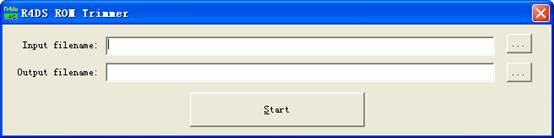

There are two textboxes, the top one for inputting the NDS/IDS game files, the '...' button can do a convenience browsing if you can't remember the file name and the path. Choose the correct input file type by clicking the pull-down menu according the ROM, which need to be trimmed. Please remember that .nds is extension of the NDS game and .ids is extension of the IDS.

The bottom textbox is for outputting the trimmed ROM's file (When you choose the input file, it will generate one automatically). You can change the output path if you need; default is the same as the input path. The '...' button can do a convenient location
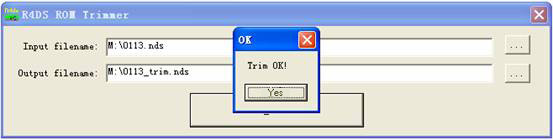
To start processing trim tool by clicking the 'Start' button once every thing is ready, a pop-up window will display the processing status.

You can see the difference between the trimmed ROM'S file and the original file, (0%-50% trims will be available according to the different ROMs.)

The Trimmed ROM can be copied and run on the SD/TF card directly!

Tips: The processing on the hard disk will be faster than processing on the SD/TF card as the hard disk has the higher read/write speed.


Interface overview:
Download address :
Download 1

products detail from : http://www.acceshop4u.com/
where to buy r4i sdhc:
http://www.acceshop4u.com/r4i-sdhc-revolution-for-nintendo-dsi-ds-lite-p-87777.html

5/28/2010

R4i SDHC “System Date Error” Problem NDS-Gear was Solved by NDS-Gear

We are pleased to report that NDS-Gear (yes, us!) have successfully found the part of the code that was causing the error in the genuine R4i SDHC’s software. The error people were experiencing was:


“Loading… System date error! Please check NDS system date.”

This was caused by a software incompatibility to continue to function when the dates on the Nintendo DS / DSi were set differently than the files on the Micro-SD card. This problem could have arisen when a user transferred a .SAV file from a DS with a different date, or the DS ran out of battery.

In most cases, setting the date back a few days temporarily solved the problem – and in some cases up to a month was required!

However, we isolated the code that was apparently causing the issue yesterday, and sent our fix to the R4i SDHC team. Hopefully they will update the official software to reflect this change soon. In the mean time, the software from NDS-Gear, which can be downloaded on our R4i Software Downloads page, is a permanent fix to the issue for the R4i SDHC card!

Please note: this fix (i.e. the software) will NOT work for FAKE R4i SDHC cards (i.e. the ones from r4isdhc.com as opposed to r4i-sdhc.com).

Always going the extra step for you!

All the best,
The NDS-Gear Team

the source from:http://www.acceshop4u.com/
where to buy R4i SDHC :
http://www.acceshop4u.com/r4i-sdhc-revolution-for-nintendo-dsi-ds-lite-p-87777.html

1/27/2010

R4i RTS Real Time Save support DSi

Note:R4i RTS is released today,this R4i with RTS is known be supported by M3 Team due to only supercard and m3 team have control the technology of Real Time Save.So we can expect constantly firmware support in future.

Kernel can be downloaded on official site: www.r4rts.cn

R4i RTS Functionality:
● Excellent Real Time Save Feature. (Not Real time smart help windows )
● Support SDHC (microSD 4G, 8G, 16G, 32G)
● 2nd generation storage device (no booting tool required)
● Game compatibility 100%
● Uses microSD card, FAT or FAT32
● Supports any microSD card speed with no lag in game
● Supports Clean ROM, drag and drop to play. Fast Loading .
● Built-in NoPass
● Automatically detect save type
● Save directly to microSD card, not to onboard chip
● Support download play
● Supports rumble pack and memory pack
● Supports the Wi-Fi game, DS Rumble Pack, DS Browser
● Support changes of the background and font colors on Main Menu and Game Menu manually and automatically
● Supports 4-scale-lightness adjustment
● Supports Soft Reset
● Supports AR cheat code
● Supports Moonshell 2.0 & Homebrew .
● DLDI auto-patching
● Support multi-language .
● Intergraded least Moonshell 2.0 version.

saurce from: http://www.gamedepot4u.com/r4i-rts-real-time-save-support-dsi-p-67.html

1/20/2010

R4i SDHC Revolution Card for DSi

R4i RTS is released today,this R4i SDHC is known be supported by M3 Team due to only supercard and m3 team have control the technology of Real Time Save.So we can expect constantly firmware support in future.


Description:


R4i SDHC Functionality :

  • Support SDHC (microSD 4G, 8G, 16G, 32G)
  • 2nd generation storage device (no booting tool required)
  • Game compatibility 100%
  • Uses microSD card, FAT or FAT32
  • Supports any microSD card speed with no lag in game
  • Supports Clean ROM, drag and drop to play. Fast Loading .
  • Built-in NoPass
  • Automatically detect save type
  • Save directly to microSD card, not to onboard chip
  • Support download play
  • Supports rumble pack and memory pack
  • Supports the Wi-Fi game, DS Rumble Pack, DS Browser
  • Support changes of the background and font colors on Main Menu and Game Menu manually and automatically
  • Supports 4-scale-lightness adjustment
  • Supports Soft Reset
  • Supports AR cheat code
  • Supports Moonshell 2.0 & Homebrew .
  • DLDI auto-patching
  • Support multi-language .
  • Intergraded least Moonshell 2.0 version .
What's included:
  • 1 x R4i SDHC chip
  • 1 x MicroSD 2.0 Card Reader
where to buy :
http://www.gamedepot4u.com/r4i-sdhc-revolution-card-for-dsi-p-68.html

Kernel can be downloaded on official site: www.r4rts.cn

1/08/2010

R4-Faq

Q1: R4i don't save game. When restart the DSi, the game is started at the beginning.
Answer: The file system of the SD card might be problem, First copy all the contain of the SD card to the computer for backup, Second reformatting the SD card, for SD card more than 1GB please format to FAT32. Last copy back the backup files to the SD card again.

Q2:
An error message appears whenever restart saying that the file name of a game is too long.
Answer: There is a maximum limit of the full path name in the kernel (max 80 chars). Please reduce the filename, it will work again.

Q3: How to change the language setting of the R4i?
Answer: To change prefer language, press “X, B” to select the “language” setting button which locate at the top screen (third icon from the top). User also can configure the “language.ini” locate at the R4iMenu folder to configure the preference language manually.
Q4: When start it up with a download game, the game cannot play.
Answer: That is due to the anti‐flash card routine of the new games. Download the latest version of the R4i kernel which provides the solution for the game, in the meanwhile temporary can use the patch version of the ROM (if available in the web). Report the name of problem game to the R4i‐SDHC support team.

Q5:
How to customize or change R4i skin?
Answer:
Can download customize skin from the official web site . To create the own customize skins/themes; please refer to the document “ English kernel download instruction” which can be found at the official web site. For the R4i v1.08b onward the kernel will able to support multiple skins, user can install maximum up to 8 skins/themes to the kernel.

Q6:
If the games list is pretty large, and only 4 games at a time as I scroll thru them, and each has its own icon. It takes forever to scroll thru the list. Is there a way to just view text?
Answer:
There is a “zoom in/out” icon at the left bottom corner of the bottom/touch screen. Press it to switch to the text view mode. Also can use the left/right button the scroll the list by page mode, each page contain 4 games.

Q7:
How to return back to the firmware/kernel during playing game?
Answer: Press at the keys (left + right + up + down + X + Y + B + A + L + R) during playing games.

Q8: How to enable game cheating?
Answer: First highlight the NDS ROM you want to apply the cheats to. Second press the B button to go into the cheats options menu and checkmark each cheat you want to enable. Third turn the cheats on for that ROM by clicking the cheat on/off button. Last you'll notice the wrench icon will be yellow which indicates cheats are on. You have to press “x” or “B” to view the cheats and to turn it on don’t forget to press the save button when the cheat is on the grey key turns gold Gold= ON Gray= OFF Please update the “usrcheat.dat” from the ‐SDHC official web site to support cheat function of new games.

Q9: How to return back to the firmware/kernel from Moonshell (multimedia player)?
Answer: Press “start” button, and select the “Return to the firmware” from the menu.

Q10: Stuck at the “MENU” screen after loading DSi.
Answer: No firmware or wrong firmware was installed in the SD card. Please refer to the instruction to install R4i‐SDHC to the SD card. The instruction can be found at the R4i‐SDHC official web site .

Q11: Stuck at the “NO CARD” screen after loading DSi.
Answer: SD Card not found. Please check whether SD card was insert properly or not into the flash card. Otherwise SD card could be fault.

Q12: Stuck at the “LOADING” screen after loading DSi.

Make sure using the official firmware from the R4i‐SDHC official web site www.gamedepot4u.com Or the flash card is not “R4I‐SDHC or R4‐SDHC”.


Blogger Templates by Isnaini Dot Com. Powered by Blogger and Supported by Ralepi.Com - BMW Motorcycle
Web Blogs Directory